
Timesheet Approver Role & User Setup
This document explains how to configure the Timesheet Approver role and user. The Timesheet Approver will have access only to the Timesheets module and can review and approve timesheets for assigned users.
Step 1: Create a Client Timesheet Approver Role
Create a role that has access only to the Timesheets module.
Steps:
1. Navigate to Roles Management.
2. Create a new role named 'Client Timesheet Approver'.
3. Enable only the Timesheets module.
4. Disable all other modules.
5. Save the role.
Step 2: Create a Timesheet Approver User
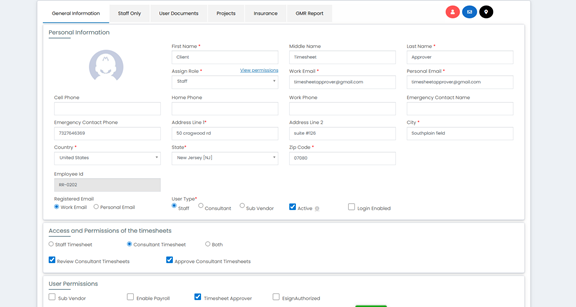
Create a user with Staff type and assign Timesheet permissions.
Configuration:
- User Type: Staff
- Assign Role: Client Timesheet Approver
- Timesheet Permissions: Review and Approve
- User Permission: Timesheet Approver
Step 3: Assign Timesheet Approver While Assigning Project
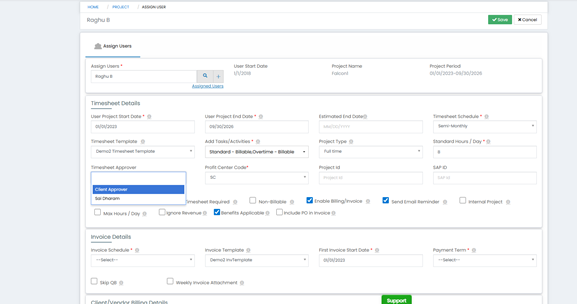
While assigning a project to an employee, select the created Timesheet Approver from the Timesheet Approver dropdown.
This links the approver to the employee’s timesheets.
Outcome
The Timesheet Approver can access only the Timesheets module and can view, review, and approve timesheets for assigned users only.